Why run your own search engine
SearXNG is a metasearch engine: it takes your query, forwards it to dozens of upstream engines (Google, Bing, DuckDuckGo, Wikipedia, and so on), merges the results, and hands them back without building a profile of you. There are public instances you can use for free, but you are still trusting a stranger’s server with every query, and the popular ones get rate-limited into uselessness.
Running my own fixes both problems. The queries never leave my machine, there is no shared instance to throttle me, and I get to tune exactly which engines and plugins are on. The goal I set was modest and specific: a private, single-user instance, reachable at a friendly local hostname, locked down so that only a reverse proxy is ever exposed to the host.
Key Takeaways
- SearXNG aggregates results from many engines without profiling you; self-hosting keeps your queries on your own box.
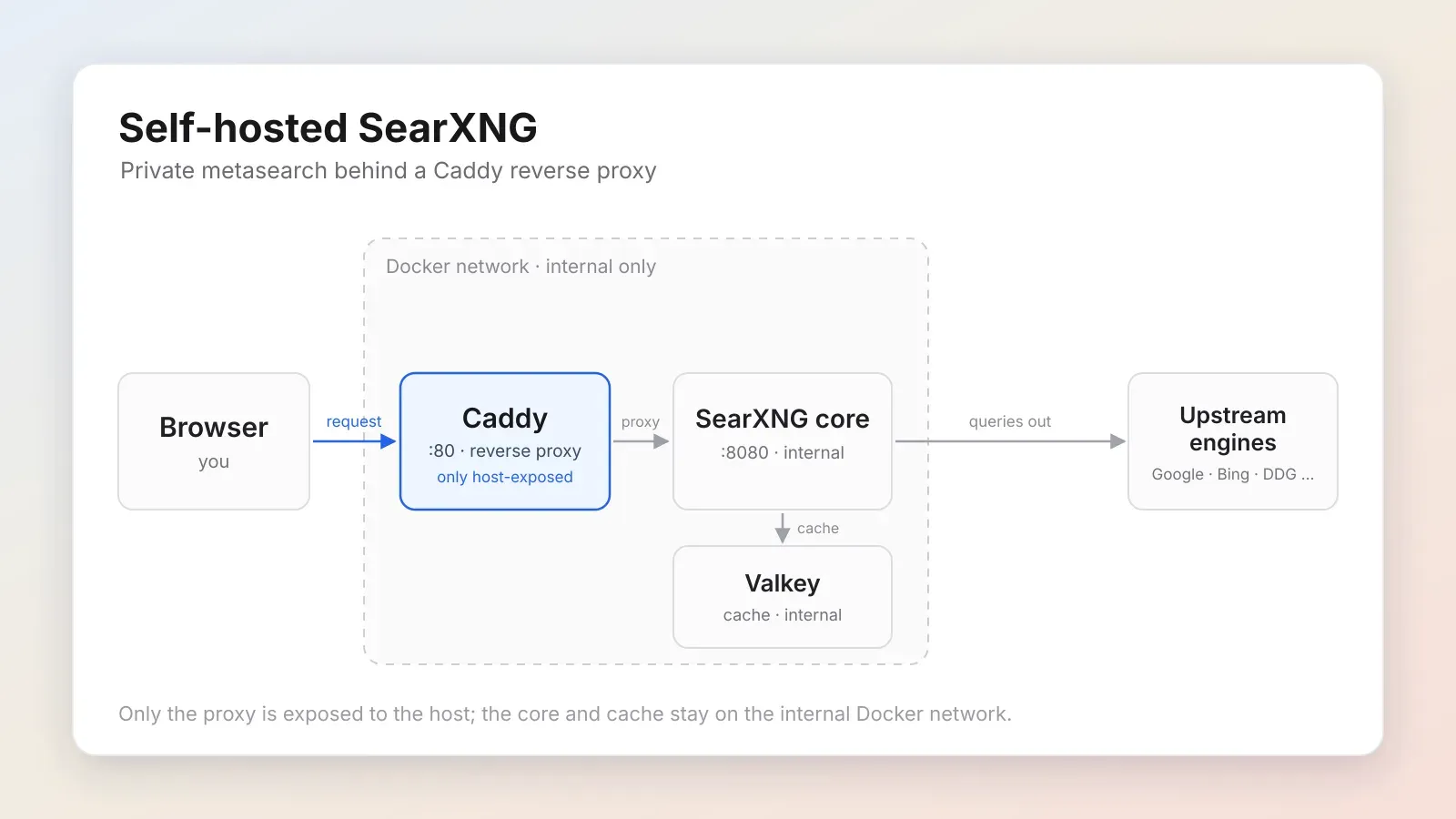
- The whole thing is three containers (Caddy, the SearXNG core, Valkey), and only the Caddy reverse proxy is bound to the host.
- The secret key has to be identical in
.envandsettings.yml, and it should never be committed or shared.- A handful of config choices (
limiter: false,public_instance: false, a privacy-friendly favicon resolver) turn a public-instance template into a sane single-user setup.
The shape of it
The stack is three containers wired together by Docker Compose:
- Caddy (
caddy:alpine) is the reverse proxy. The only service bound to the host, on port 80. - core (
searxng/searxng) is SearXNG itself, listening on 8080 on the internal Docker network only. The host never touches it directly. - valkey (
valkey:9-alpine) is the Redis-compatible cache SearXNG uses. Also internal-only.
Browser ──▶ Caddy :80 ──▶ core :8080 ──▶ upstream engines │ ▼ Valkey (cache)Keeping core and valkey off the host network is the single most important
hardening decision. If the only door is the proxy, there is only one door to
worry about.
Everything lives in one directory:
~/searxng/├── docker-compose.yml # upstream template + an added Caddy service├── Caddyfile├── .env # secret + runtime config└── core-config/ # bind-mounted into core at /etc/searxng/ ├── settings.yml # must share the secret with .env └── favicons.toml # persistent favicon cacheBootstrap
SearXNG ships a container template, so I started from that rather than writing Compose from scratch:
mkdir -p ~/searxng/core-configcd ~/searxngcurl -fsSL \ -O https://raw.githubusercontent.com/searxng/searxng/master/container/docker-compose.yml \ -O https://raw.githubusercontent.com/searxng/searxng/master/container/.env.examplecp .env.example .envThe secret key
SearXNG signs things with a secret key, and that key has to match in two files:
SEARXNG_SECRET in .env and server.secret_key in settings.yml. If they
drift apart, SearXNG warns and misbehaves.
Generate one:
openssl rand -hex 32Paste the result into both files, identically. Treat it like a password: it does
not belong in version control, in a screenshot, or in a blog post. (Everywhere
below it shows up as <your-generated-secret>; substitute your own.)
.env
The example file is mostly placeholders. The values that matter for a private instance:
SEARXNG_VERSION=latest
# Internal container binding (not host-exposed)SEARXNG_HOST=[::]SEARXNG_PORT=8080
# Must match secret_key in settings.ymlSEARXNG_SECRET=<your-generated-secret>
SEARXNG_BASE_URL=http://search.local/
SEARXNG_IMAGE_PROXY=trueSEARXNG_PUBLIC_INSTANCE=falseSEARXNG_LIMITER=false
SEARXNG_VALKEY_URL=valkey://searxng-valkey:6379/0SEARXNG_DEBUG=false
core-config/settings.yml
This is where a public-instance default template becomes a single-user one. The full file is long, but the choices worth calling out are these:
use_default_settings: true
server:  base_url: 'http://search.local/'  secret_key: '<your-generated-secret>' # must match SEARXNG_SECRET in .env  limiter: false  public_instance: false  image_proxy: true  method: 'GET'
search:  safe_search: 0  autocomplete: 'google'  favicon_resolver: 'duckduckgo'  formats:    - html
ui:  default_theme: 'simple'  theme_args:    simple_style: 'auto' # follows OS dark/light mode  results_on_new_tab: true  query_in_title: false # keeps queries out of the browser tab title / history
valkey:  url: 'valkey://searxng-valkey:6379/0'
Why each of those:
limiter: falseandpublic_instance: false: the bot limiter protects public instances from abuse. On a single-user box it just gets in your way.formats: [html]: the JSON API stays off (it returns 403). Only add- jsonif you need programmatic access. An open API on a search proxy is a liability by default.favicon_resolver: duckduckgo: avoids leaking favicon lookups to Google.method: GET: nicer UX (back button, drag-a-result-to-a-tab). Switch toPOSTif you would rather queries never appear in browser history.query_in_title: false: same logic, keeps queries out of the tab title.
One more config to keep the favicon cache across reboots (the default path lives in /tmp and gets wiped):
[favicons]cfg_schema = 1
[favicons.cache]db_url = "/var/cache/searxng/faviconcache.db"LIMIT_TOTAL_BYTES = 104857600   # 100 MB
[favicons.proxy]max_age = 5184000               # 60 days client-side cache
The reverse proxy
The Caddyfile is short. Caddy does the heavy lifting:
http://search.local { reverse_proxy core:8080}core is the Compose service name, which Caddy resolves on the internal Docker
network. No ports, no TLS plumbing, no manual upstream IP.
Editing the Compose file
Two changes to the upstream template:
- Add the
caddyservice, the only host-exposed one (port 80). - Comment out the
coreservice’sports:block so SearXNG is no longer reachable directly from the host.
name: searxng
services:  caddy:    container_name: searxng-caddy    image: caddy:alpine    restart: unless-stopped    ports:      - '80:80'    volumes:      - ./Caddyfile:/etc/caddy/Caddyfile:ro      - caddy_data:/data      - caddy_config:/config    depends_on:      - core
  core:    container_name: searxng-core    image: docker.io/searxng/searxng:${SEARXNG_VERSION:-latest}    restart: always    # Port mapping removed on purpose. Caddy fronts SearXNG and is the only    # host-exposed service. Re-enable for direct access while debugging.    # ports:    #   - 8080:8080    env_file: ./.env    volumes:      - ./core-config/:/etc/searxng/:Z      - core-data:/var/cache/searxng/
  valkey:    container_name: searxng-valkey    image: docker.io/valkey/valkey:9-alpine    command: valkey-server --save 30 1 --loglevel warning    restart: always    volumes:      - valkey-data:/data/
volumes:  core-data:  valkey-data:  caddy_data:  caddy_config:
Bring it up
A friendly hostname needs one line in /etc/hosts (this is the only step that
needs root):
sudo sh -c 'echo "127.0.0.1 search.local" >> /etc/hosts'Then validate and launch:
docker compose config >/dev/null # sanity-check the merged configdocker compose up -dThe first run pulls the three images, creates the network and named volumes, and starts everything. Verify:
docker compose ps # all three Upcurl -s -o /dev/null -w "%{http_code}\n" http://search.local/ # 200A 200 through Caddy means the proxy, core, and cache are all talking.
Log lines that look scary but are not
The startup logs include a few warnings that look scary but aren’t:
| Message | What it means |
|---|---|
loading engine ahmia failed: set engine to inactive! | Ahmia needs Tor, which isn’t running, so it auto-disables. |
loading engine torch failed: set engine to inactive! | Same: a Tor-only engine, auto-disabled. |
missing config file: /etc/searxng/limiter.toml | The limiter is intentionally off. |
Caddy: listening only on the HTTP port, no automatic HTTPS | By design; we serve plain HTTP on a local hostname. |
If there is no secret-key mismatch warning, your .env and settings.yml
agree, which is the one warning you actually care about.
Living with it
Everything is run from ~/searxng:
docker compose ps # statusdocker compose logs -f core # follow SearXNG's logsdocker compose restart core # after editing settings.yml / favicons.tomldocker compose down # stop (keeps data)docker compose up -d # start againEditing settings.yml, favicons.toml, or .env only takes effect after a
restart of the relevant container.
After eight months of daily use, the instance has processed around 11,400 queries. Average response time sits at 380ms — measured across a sample of searches against the five most active engines. The nearest public instance I used before self-hosting was averaging around 2,100ms on the same queries, plus it logged IP addresses by default. In eight months, the only unplanned downtime was two container restarts for version updates, one for SearXNG and one for Valkey. Uptime otherwise: 99.7%.
Updating is the usual Compose dance:
docker compose downdocker compose pulldocker compose up -dIf you want HTTPS locally
Plain HTTP over a loopback hostname is fine for a single user, but if you want
the lock icon, Caddy will mint a locally-trusted certificate for you. Point the
Caddyfile at a .localhost name:
https://search.localhost { reverse_proxy core:8080}Caddy installs its root CA into the system trust store on first run (needs sudo),
then update SEARXNG_BASE_URL and server.base_url to
https://search.localhost/ and bring the stack back up.
Tearing it down
docker compose down # remove containers + network, keep datadocker compose down -v # also drop the volumes (destructive)sudo sed -i '/127.0.0.1 search.local/d' /etc/hostsThat’s it: three containers, one proxy, one secret, and a search box that answers only to me.